> For the complete documentation index, see [llms.txt](https://docs.leadbay.app/doc/llms.txt). Markdown versions of documentation pages are available by appending `.md` to page URLs; this page is available as [Markdown](https://docs.leadbay.app/doc/documentation-leadbay/guides-produit/manager-dashboard.md).
# Tableau de bord Manager
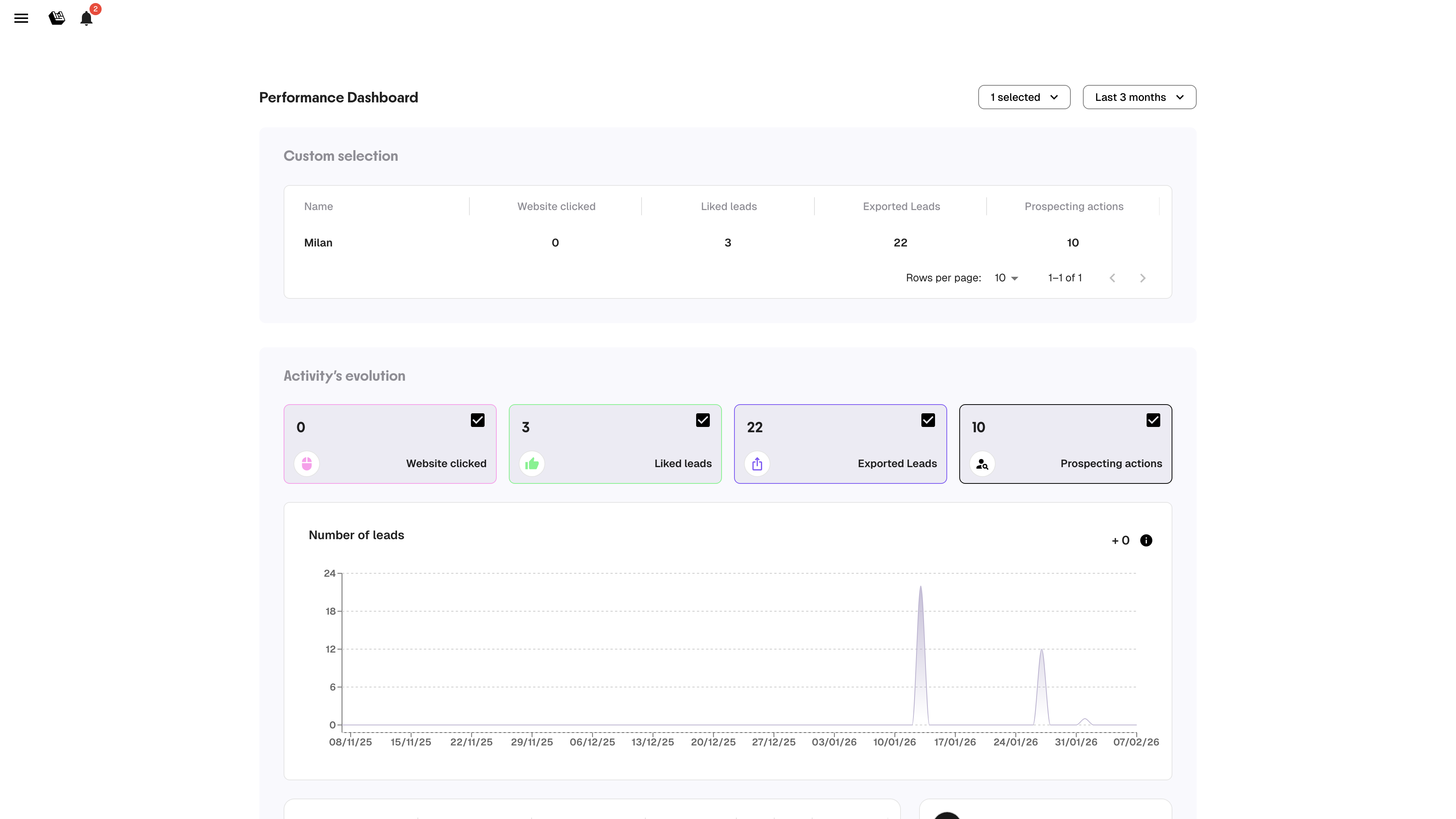
Le Dashboard offre aux managers une visibilité sur l'activité de prospection de leur équipe, et permet aux commerciaux de suivre leur propre performance.
Tableau de bord Manager
***
## Accès
Ouvrez le menu latéral (icône hamburger, en haut à gauche) et cliquez sur **Dashboard**.
***
## Filtres
En haut du Dashboard, deux contrôles :
* **Sélecteur de membres** : un, plusieurs ou tous les membres de l'équipe
* **Période** : 3 derniers mois, dernier mois, dernière semaine, ou personnalisée
***
## Tableau de métriques
| Métrique | Ce qu'elle mesure |
| ----------------------- | ----------------------------------------------------------- |
| **Website clicked** | Nombre de sites web de leads visités |
| **Liked leads** | Leads likés |
| **Exported leads** | Leads exportés en CSV ou vers le CRM |
| **Prospecting actions** | Actions enregistrées (still chasing, meeting planned, etc.) |
Chaque ligne correspond à un membre de l'équipe. Utilisez ce tableau pour repérer qui est actif et qui pourrait avoir besoin de soutien.
***
## Graphique d'évolution
Sous le tableau, un graphique montre l'évolution dans le temps pour chaque métrique. Activez/désactivez les métriques avec les cases à cocher pour vous concentrer sur ce qui compte.
Ce graphique capture **chaque interaction** — les chiffres peuvent être plus élevés que la liste de leads (un utilisateur peut interagir plusieurs fois avec le même lead).
{% hint style="info" %}
Ouvrez le Dashboard à chaque réunion d'équipe hebdomadaire. 10 secondes suffisent pour repérer qui construit son élan et qui décroche.
{% endhint %}
---
# Agent Instructions
This documentation is published with GitBook. GitBook is the documentation platform designed so that both humans and AI agents can read, navigate, and reason over technical content effectively. Learn more at gitbook.com.
## Querying This Documentation
If you need additional information that is not directly available in this page, you can query the documentation by asking a question.
Perform an HTTP GET request on the following URL with the `ask` and `goal` query parameters:
```
GET https://docs.leadbay.app/doc/documentation-leadbay/guides-produit/manager-dashboard.md?ask=&goal=
```
`ask` is the immediate question: it should be specific, self-contained, and written in natural language.
`goal` is what the user is ultimately trying to achieve, the reason they need the answer. Sharing it helps GitBook give you a better, more relevant answer. A goal is most helpful when it describes the outcome the user wants rather than restating the question. For example, with `ask=how do I create an API token`, a goal like `automate deployments from our CI pipeline` lets GitBook tailor the answer to that use case.
The response will contain a direct answer to the question and relevant excerpts and sources from the documentation.
Use this mechanism when the answer is not explicitly present in the current page, you need clarification or additional context, or you want to retrieve related documentation sections.