> For the complete documentation index, see [llms.txt](https://docs.leadbay.app/doc/llms.txt). Markdown versions of documentation pages are available by appending `.md` to page URLs; this page is available as [Markdown](https://docs.leadbay.app/doc/product-guides/lead-profile.md).
# Lead Profile
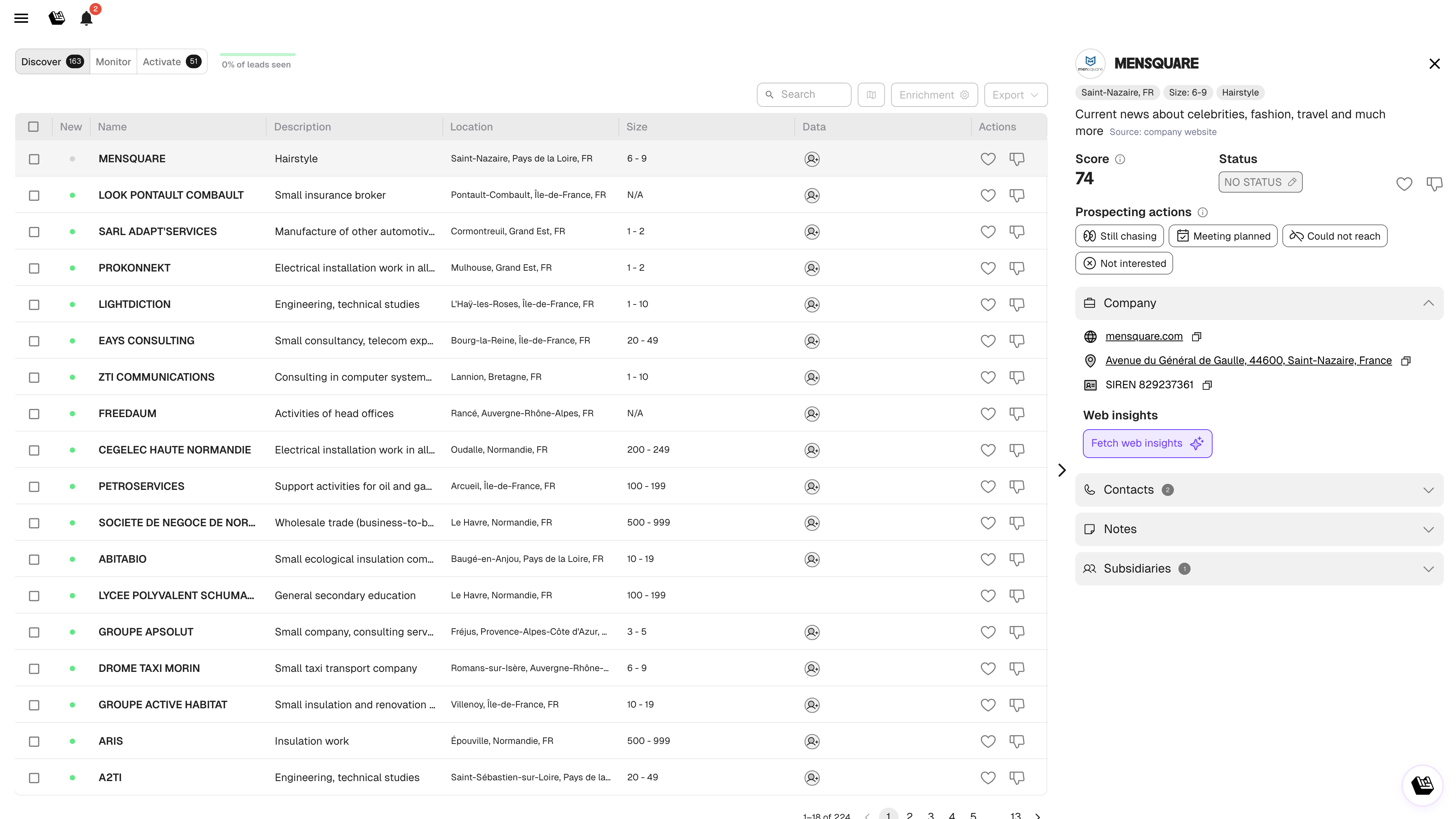
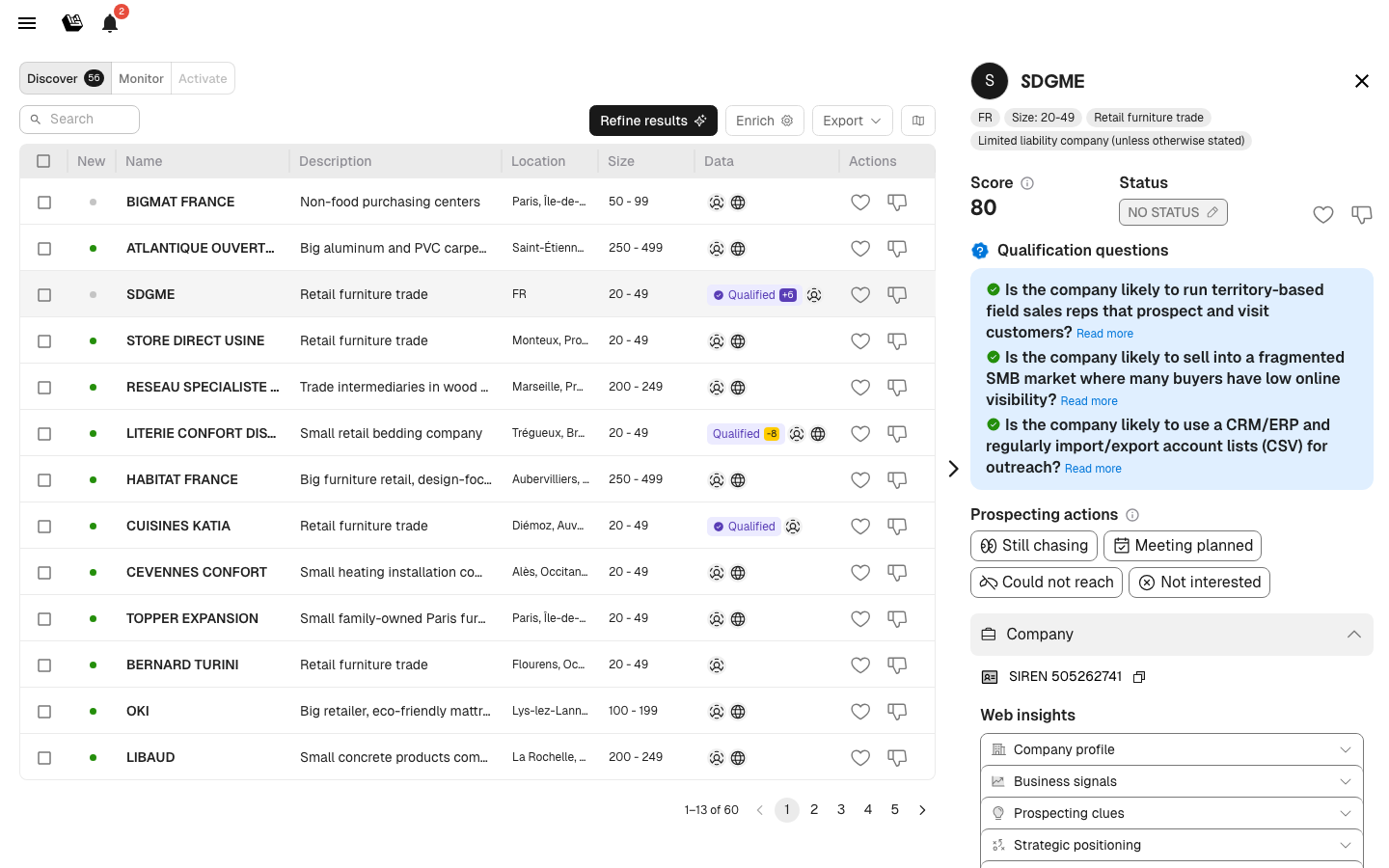
Click any lead name to open its profile. The profile is your central view for understanding a company and deciding how to engage.
Lead profile
The profile is organized top-to-bottom in the order you typically need information: identity → who to talk to → AI take → qualification → deeper accordions.
***
## Header
At the top of every profile you'll find:
* **Company name** and logo
* **Tags**: location, employee size, sector
* **Short description** (AI-generated from public data) — click **Read more** for the full version
***
## Recommended & Pinned Contacts
Right under the header, you'll see either:
* A **Recommended contact** — automatically selected by Leadbay based on your target persona
* Or one or more **Pinned contacts** — contacts you (or a teammate) have explicitly chosen to keep at the top
Click the pin icon on any org contact card to pin it. Pinning swaps the recommended contact for your pinned selection(s). Unpin them all and the recommended one re-appears. Pins are organization-level, so the rest of your team sees the same prioritization.
Each pinned/recommended contact card is condensed — job title sits next to the name — and shows the phone, email, and LinkedIn at a glance.
***
## Requalify
Click **Requalify** to pull fresh data from the company's website and re-run the full AI assessment:
* **Company profile**: activities, products, services, employee count, target market
* **Key people & organization**: decision-makers and org structure
* **Technologies & Innovation**: tools and software the company uses
Results are cached — you can requalify anytime for an updated assessment based on the latest website data.
***
## Score, Status & Likes
* **Score** (0–99): how closely this lead matches your liked leads and won deals. The small badge next to it shows the AI **boost** contribution (positive / neutral / negative).
* **Status**: click to change (NO STATUS, WANTED, WON, LOST)
* **Like / Dislike** buttons
***
## Intent Tags
Short colored tags that summarize why Leadbay flagged this company (e.g. "Fragmented SMB Market", "Hiring sales"). They reflect signals the AI surfaced while qualifying.
***
## Prospecting Actions
Quick buttons to log your outreach activity:
| Action | When to use |
| ------------------- | --------------------------------------- |
| **Still chasing** | You've reached out, waiting for a reply |
| **Meeting planned** | A meeting is confirmed |
| **Could not reach** | No response after attempts |
| **Not interested** | The lead explicitly declined |
These actions appear in the Activate tab and are tracked in the Manager Dashboard.
***
## AI Summary & Qualification
If the [AI Assistant](/doc/product-guides/ai-assistant.md) is configured:
* An **AI summary** appears with context and predictions
* **Qualification answers** show as indicators: 🟢 positive, 🔘 neutral, 🔴 negative
* **Predicted next steps** and recommended approach angles
These help you prepare before reaching out, without manual research.
### AI Reasoning
When the AI qualifies a lead, it can display its reasoning process. You can read step-by-step how the model interprets public data, web insights, and your qualification questions to reach its assessment. This transparency helps you understand — and trust — the AI's recommendations.
The AI's reasoning, visible in the lead profile
***
## Accordion Sections
Further down, expandable sections hold everything else:
### Company
Firmographic data:
* **Website** (clickable link)
* **Address** (with map link)
* **SIREN** number (for French companies, clickable to copy)
* **Social media** links
### Contacts
* **Enriched/added contacts**: contacts with email, phone, LinkedIn already available
* **To be enriched contacts**: suggested contacts based on your target persona — click **Enrich** to get their details
See [Contact Enrichment](/doc/product-guides/contact-enrichment.md) for details.
### Notes
A space to capture notes about the lead. You can:
* Type notes directly
* Upload a file or photo (e.g., business card)
* Notes are visible to your team and saved chronologically
### History
Timeline of all interactions: status changes, likes, enrichments, exports. Helps you see the full engagement story at a glance.
### Subsidiaries
Shows related entities and child companies within the same corporate group. Useful for expanding prospecting within a group structure.
---
# Agent Instructions
This documentation is published with GitBook. GitBook is the documentation platform designed so that both humans and AI agents can read, navigate, and reason over technical content effectively. Learn more at gitbook.com.
## Querying This Documentation
If you need additional information that is not directly available in this page, you can query the documentation by asking a question.
Perform an HTTP GET request on the following URL with the `ask` and `goal` query parameters:
```
GET https://docs.leadbay.app/doc/product-guides/lead-profile.md?ask=&goal=
```
`ask` is the immediate question: it should be specific, self-contained, and written in natural language.
`goal` is what the user is ultimately trying to achieve, the reason they need the answer. Sharing it helps GitBook give you a better, more relevant answer. A goal is most helpful when it describes the outcome the user wants rather than restating the question. For example, with `ask=how do I create an API token`, a goal like `automate deployments from our CI pipeline` lets GitBook tailor the answer to that use case.
The response will contain a direct answer to the question and relevant excerpts and sources from the documentation.
Use this mechanism when the answer is not explicitly present in the current page, you need clarification or additional context, or you want to retrieve related documentation sections.