> For the complete documentation index, see [llms.txt](https://docs.leadbay.app/doc/llms.txt). Markdown versions of documentation pages are available by appending `.md` to page URLs; this page is available as [Markdown](https://docs.leadbay.app/doc/product-guides/ai-assistant.md).
# AI Assistant
The AI Assistant automatically qualifies leads by answering custom questions about each company. It helps you focus on leads that truly match your ICP without manual research.
***
## How It Works
1. You define your organization profile and qualification questions
2. The AI analyzes each lead using public data, web insights, and your ICP description
3. Answers appear directly in lead profiles as color-coded indicators (🟢🔘🔴)
4. Answers factor into the lead score, pushing better-qualified leads higher
***
## Configuration
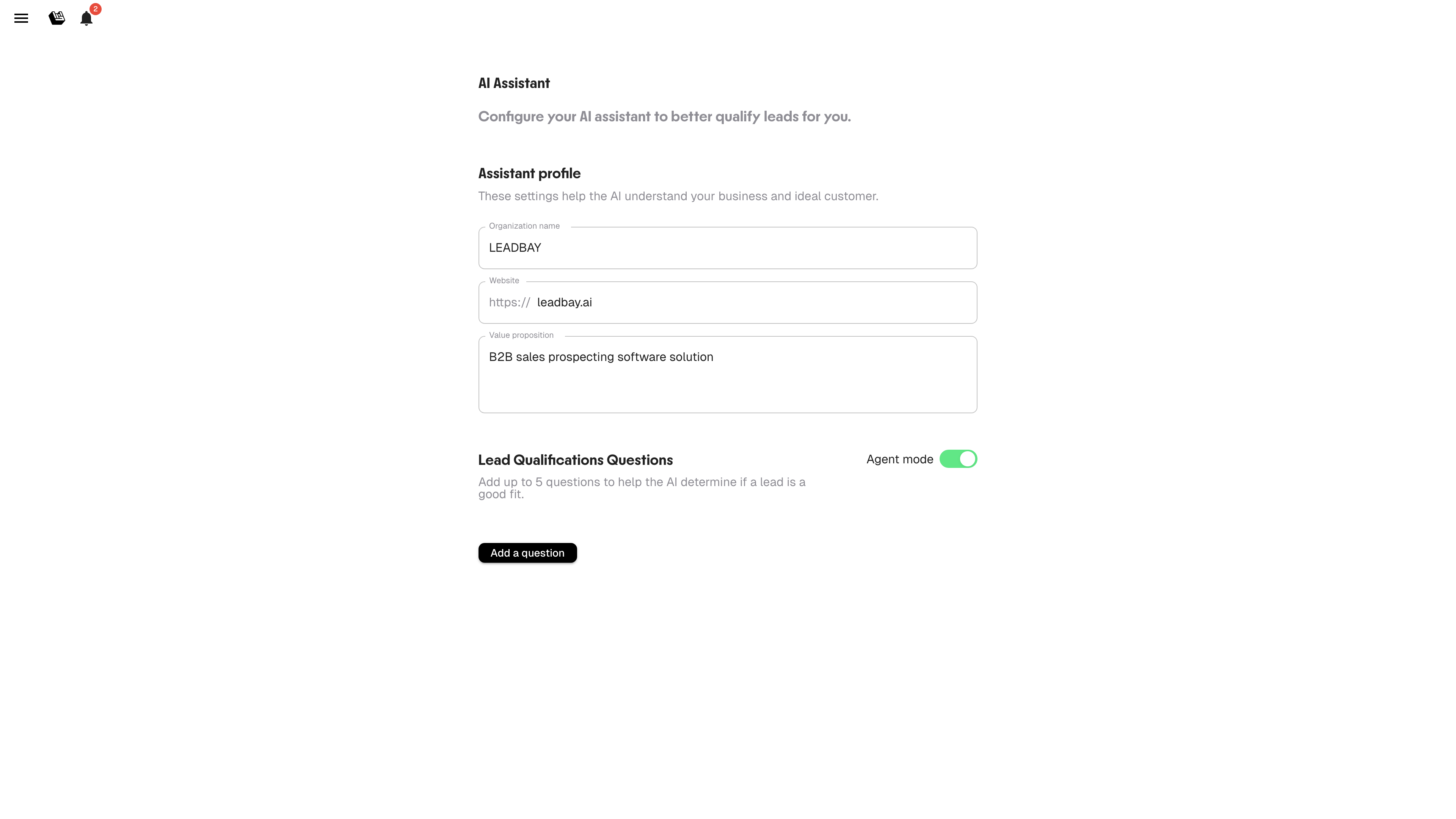
Open **AI Assistant** from the side menu (hamburger icon, top-right).
AI Assistant configuration
### Assistant Profile
Fill in these fields to calibrate the AI:
| Field | What to enter |
| --------------------- | --------------------------------------- |
| **Organization name** | Your company name |
| **Website** | Your company website URL |
| **Value proposition** | What you sell and to whom — be specific |
The clearer your value proposition, the better the AI understands what makes a lead relevant.
### Qualification Questions
Add up to **5 questions** that matter for your qualification process.
**Examples:**
* "Does this company use a CRM?"
* "Are they hiring salespeople?"
* "Do they operate in the construction sector?"
* "Is their revenue growing?"
* "Do they have an international presence?"
The AI will attempt to answer each question for every lead in your pipeline. Answers show as:
* 🟢 **Yes / Positive signal**
* 🔘 **Unknown / Unclear**
* 🔴 **No / Negative signal**
### Agent Mode
Toggle **Agent mode** on to have the AI proactively suggest next steps and approach angles for each lead. When enabled, lead profiles include AI-generated recommendations for how to engage.
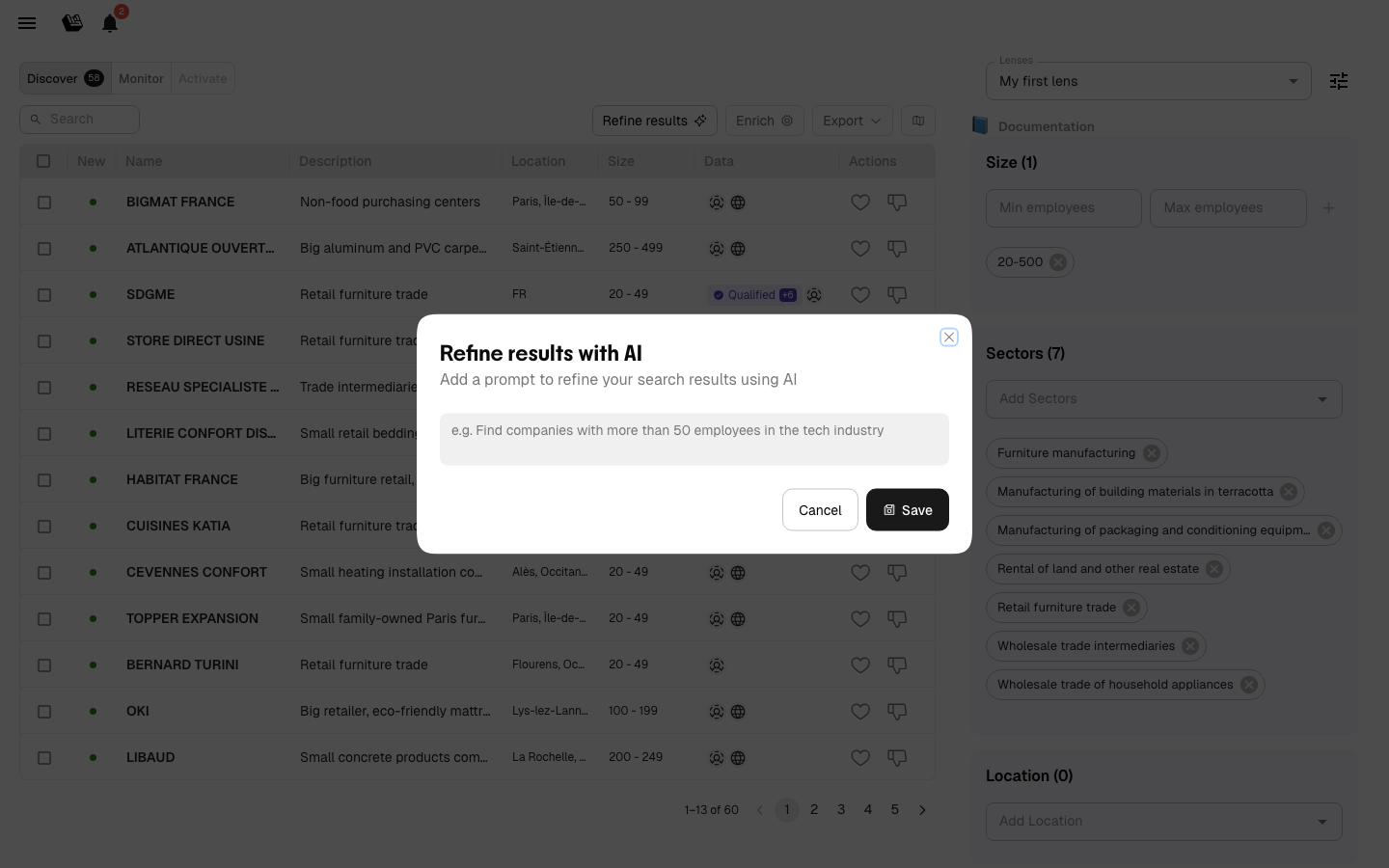
### Refine Results
In addition to qualification questions, you can describe your ideal lead in free text using the **Refine results** prompt. This works like a search instruction — tell the AI what kind of companies you are looking for, and it will adjust its recommendations accordingly.
The text prompt complements your filters and questions: filters set hard boundaries, questions qualify individual leads, and the text prompt guides the overall direction of recommendations.
Enter a text description to guide AI recommendations
***
## Impact on Scoring
Qualification answers influence the lead score. Leads that answer positively to more of your questions rank higher. Combined with like/dislike signals and won deal history, this creates a multi-layered scoring system.
{% hint style="info" %}
Start with 2-3 questions and refine over time. Too many vague questions dilute the signal.
{% endhint %}
---
# Agent Instructions
This documentation is published with GitBook. GitBook is the documentation platform designed so that both humans and AI agents can read, navigate, and reason over technical content effectively. Learn more at gitbook.com.
## Querying This Documentation
If you need additional information that is not directly available in this page, you can query the documentation by asking a question.
Perform an HTTP GET request on the following URL with the `ask` and `goal` query parameters:
```
GET https://docs.leadbay.app/doc/product-guides/ai-assistant.md?ask=&goal=
```
`ask` is the immediate question: it should be specific, self-contained, and written in natural language.
`goal` is what the user is ultimately trying to achieve, the reason they need the answer. Sharing it helps GitBook give you a better, more relevant answer. A goal is most helpful when it describes the outcome the user wants rather than restating the question. For example, with `ask=how do I create an API token`, a goal like `automate deployments from our CI pipeline` lets GitBook tailor the answer to that use case.
The response will contain a direct answer to the question and relevant excerpts and sources from the documentation.
Use this mechanism when the answer is not explicitly present in the current page, you need clarification or additional context, or you want to retrieve related documentation sections.