> For the complete documentation index, see [llms.txt](https://docs.leadbay.app/doc/llms.txt). Markdown versions of documentation pages are available by appending `.md` to page URLs; this page is available as [Markdown](https://docs.leadbay.app/doc/product-guides/manager-dashboard.md).
# Manager Dashboard
The Dashboard gives managers visibility into their team's prospecting activity, and lets individual reps track their own performance.
Manager Dashboard
***
## Accessing the Dashboard
Open the side menu (hamburger icon, top-left) and click **Dashboard**.
***
## Filters
At the top of the dashboard, two controls:
* **Team member selector**: pick one, several, or all team members
* **Time range**: Last 3 months, Last month, Last week, or custom range
***
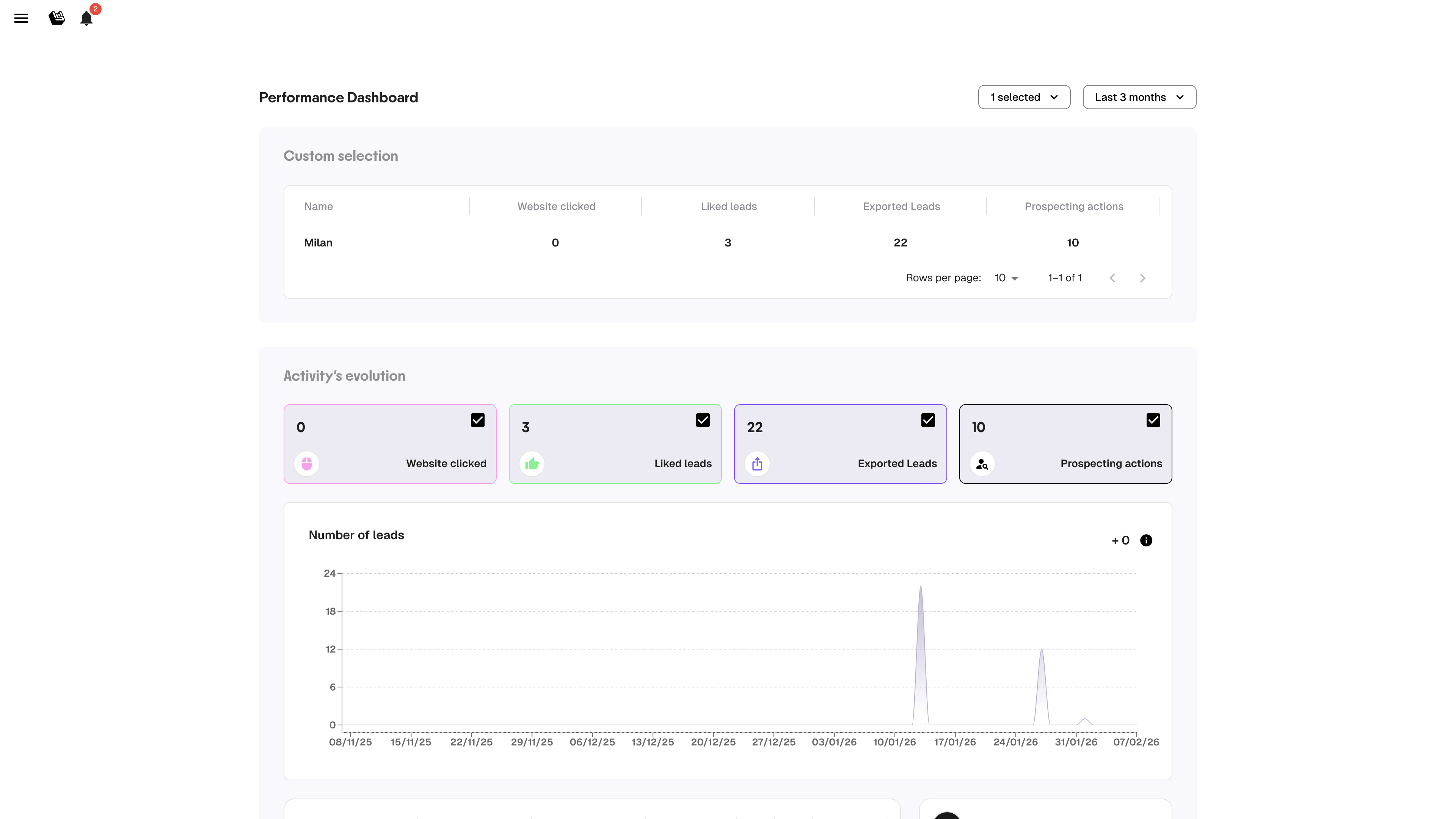
## Metrics Table
A table comparing team members across four key indicators:
| Metric | What it counts |
| ----------------------- | ----------------------------------------------------- |
| **Website clicked** | Number of lead websites visited |
| **Liked leads** | Leads liked (thumbs up) |
| **Exported leads** | Leads exported to CSV or CRM |
| **Prospecting actions** | Actions logged (still chasing, meeting planned, etc.) |
Each row is one team member. Use this to spot who's active and who might need support.
***
## Activity Evolution Chart
Below the table, a chart shows the trend over time for each metric. Toggle metrics on/off using the checkboxes to focus on what matters.
This chart captures **every interaction**, so numbers may be higher than the lead list (a user can interact with the same lead multiple times).
{% hint style="info" %}
Open the Dashboard at every weekly team meeting. It takes 10 seconds to spot who's building momentum and who's falling behind.
{% endhint %}
---
# Agent Instructions
This documentation is published with GitBook. GitBook is the documentation platform designed so that both humans and AI agents can read, navigate, and reason over technical content effectively. Learn more at gitbook.com.
## Querying This Documentation
If you need additional information that is not directly available in this page, you can query the documentation by asking a question.
Perform an HTTP GET request on the following URL with the `ask` and `goal` query parameters:
```
GET https://docs.leadbay.app/doc/product-guides/manager-dashboard.md?ask=&goal=
```
`ask` is the immediate question: it should be specific, self-contained, and written in natural language.
`goal` is what the user is ultimately trying to achieve, the reason they need the answer. Sharing it helps GitBook give you a better, more relevant answer. A goal is most helpful when it describes the outcome the user wants rather than restating the question. For example, with `ask=how do I create an API token`, a goal like `automate deployments from our CI pipeline` lets GitBook tailor the answer to that use case.
The response will contain a direct answer to the question and relevant excerpts and sources from the documentation.
Use this mechanism when the answer is not explicitly present in the current page, you need clarification or additional context, or you want to retrieve related documentation sections.